Weekly Class Schedule Generator (No Login Required)
If you’re searching for a weekly class schedule generator, you probably want something simple:
- Create your schedule.
- Organize recurring lessons.
- Avoid time conflicts.
- Move on with your work
Instead, most tools you’ll find online require accounts, subscriptions, or cloud access.
This guide explains what a weekly class schedule generator should do — and why an offline desktop solution may be the smarter long-term option for teachers and tutors.
What Is a Weekly Class Schedule Generator?
A weekly class schedule generator is a tool that helps you:
- Create repeating weekly time blocks
- Assign students or sessions
- Visualize your entire week at a glance
- Manage recurring lessons efficiently
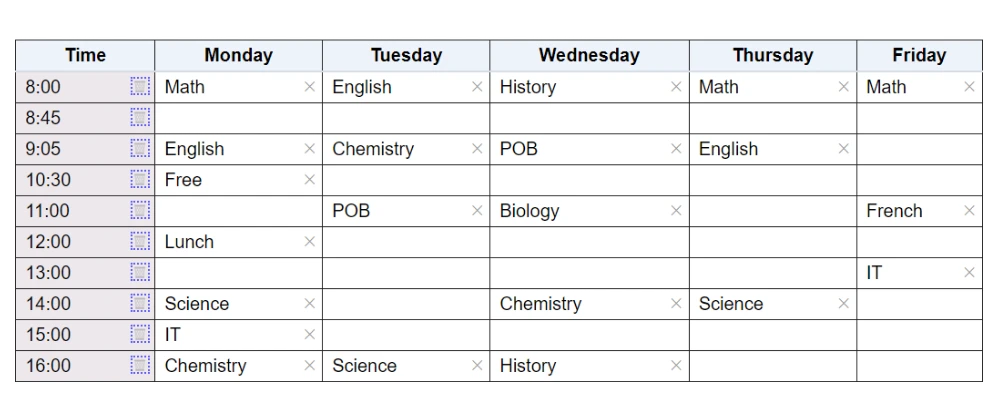
Unlike printable templates, a generator structures your week dynamically. It reduces manual adjustments and keeps everything organized inside a clear grid.
See how schedule makers compare to schedule generators. But not all generators are built the same way.
The Problem With Most Online Schedule Generators
When you search for terms like:
- weekly class schedule generator
- automatic schedule generator online
- free online schedule maker
Most results are cloud-based tools.
They usually:
- Require sign-up
- Store your data on external servers
- Lock features behind subscriptions
- Add unnecessary complexity
For independent tutors and teachers, that’s often more than necessary.
You don’t need:
- Team collaboration dashboards
- Project management layers
- Shared workspaces
- Monthly billing cycles
You need a reliable way to manage recurring weekly lessons.
Offline vs Online Weekly Schedule Generators
There are two main approaches:
1️⃣ Online Generators
Pros:
- Accessible from anywhere
- Sometimes free at basic level
Cons:
- Requires internet
- Often subscription-based
- Cloud data storage
- Account setup required
- Can feel bloated
2️⃣ Offline Desktop Generators
Pros:
- Works without internet
- No account login
- Faster launch
- No server downtime
- Greater data control
Cons:
- Installed on one device
For many educators, the tradeoff favors simplicity and reliability.
Meet ScheduleMaker — An Offline Weekly Class Schedule Generator for Windows
ScheduleMaker is a Windows desktop scheduling tool built specifically for teachers and tutors who manage recurring weekly sessions.
It runs completely offline after activation.
There are:
- No accounts
- No subscription plans
- No cloud storage
- No login friction
It focuses entirely on structured weekly scheduling.
If you haven’t read our full breakdown of the offline version, start here:
👉Offline Class Weekly Schedule Maker for Teachers (Windows Desktop App)
How ScheduleMaker Works
ScheduleMaker centers around a visual weekly grid.
You can:
- Add time slots
- Assign students to recurring weekly sessions
- See your full week clearly
- Remove or adjust entries quickly
- Export backups for safekeeping and restoring if needed
It’s designed specifically for repeating educational schedules — not team collaboration or corporate project management.
Free vs Pro: What’s Included?
ScheduleMaker offers a simple, transparent model.
Free Version
With the free download, you can:
- Create up to 6 time slots
- Assign students to those slots
- View your weekly structure
- Export a backup of your schedule
Export a backup of your schedule
Pro Version (One-Time Purchase)
ScheduleMaker Pro removes limits and unlocks the full scheduling experience.
With Pro, you get:
- Unlimited time slots for growing weekly schedules
- Import and export backup functionality
- Drag target highlighting for easier adjustments
- Advanced scheduling polish for a smoother workflow
- All current and future Pro features
- Permanent device-based activation
- Free future upgrades
For tutors managing 10, 20, or 30+ sessions per week, unlimited time slots make the tool scalable.
Pay once. Use forever.
- No subscriptions.
- No renewals.
- No cloud dependency.
Pro features are unlocked locally — your data stays on your machine.
After purchase, simply enter your license key to activate pro features.
Who Should Use an Offline Weekly Class Schedule Generator?
ScheduleMaker works especially well for:
- Private tutors
- Independent teachers
- Coaches with weekly sessions
- Educators managing recurring lesson blocks
- Anyone who prefers desktop software
If your schedule repeats weekly, you benefit from a visual structure that stays consistent and easy to adjust.
Why Teachers Are Moving Away From Cloud Scheduling Tools
There is growing fatigue around:
- Subscription overload
- Software complexity
- Logins and password resets
- Data privacy concerns
An offline weekly class schedule generator offers:
- Control
- Stability
- Speed
- Predictable cost
Sometimes simpler tools produce better results.
When to Choose an Offline Generator
An offline solution is ideal if you:
- Primarily work from one computer
- Don’t need cloud syncing
- Prefer predictable one-time pricing
- Value privacy and local data storage
- Want something distraction-free
If that sounds like you, explore how the offline version works here:
👉 Offline Class Weekly Schedule Maker for Teachers (Windows Desktop App)
Frequently Asked Questions
What is a weekly class schedule generator?
A weekly class schedule generator helps you create and manage recurring lesson schedules using a structured weekly layout.
Do I need an account to use a schedule generator?
Many online tools require accounts, but offline tools like ScheduleMaker do not.
What is the advantage of offline scheduling?
Offline scheduling offers faster performance, no login requirements, and full control over your data.
Final Thoughts
A weekly class schedule generator should:
- Simplify your week
- Reduce scheduling errors
- Support recurring lessons
- Save you time
It shouldn’t force you into subscriptions or unnecessary platforms.
If you value clarity, control, and reliability, an offline Windows desktop scheduling tool may be exactly what you need.